C#でカラーの値をRGBカラーコードを表示するサンプル。
このサンプルでは以下の処理を行う。
1.「色の設定」ダイアログを表示。
2.設定した色を使用し、ボタン背景色を変更
3.ボタンの文字色を、背景色の反転カラーに変更
4.設定した色をRGBカラー(16進数6桁の文字列)として表示
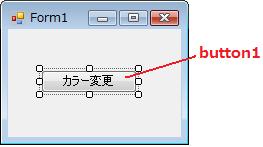
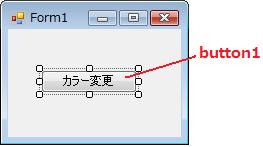
GUIデザインでは、Formにbutton1という名前のボタンを貼り付ける。
ソースコードは以下の通り。
using System;
using System.Collections.Generic;
using System.ComponentModel;
using System.Data;
using System.Drawing;
using System.Text;
using System.Windows.Forms;
namespace WindowsFormsApplication1
{
	public partial class Form1 : Form
	{
		public Form1()
		{
			InitializeComponent();
		}

		private void button1_Click(object sender, EventArgs e)
		{
			// [色の設定]ダイアログを表示
			ColorDialog colorDialog1 = new ColorDialog();
			if (colorDialog1.ShowDialog() == DialogResult.OK)
			{
				// 色を取得
				System.Drawing.Color col = colorDialog1.Color;
				// ボタンの背景色を選択したカラーに変更
				button1.BackColor = col;
				// ボタンの文字を反転カラーに変更(RGBをそれぞれ反転)
				button1.ForeColor =
				Color.FromArgb(0xFF - col.R, 0xFF - col.G, 0xFF - col.B);
				// 色を数値から、16進数の文字列として表現させる
				string strColor = "#" +
				col.R.ToString("X2") +  // Red(赤)  を16進数2桁表示
				col.G.ToString("X2") +  // Green(緑)を16進数2桁表示
				col.B.ToString("X2");   // Blue(青) を16進数2桁表示
				button1.Text = strColor;
			}
		}
	}
}
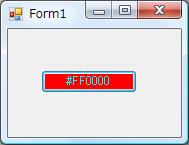
実行後、ボタンをクリックし、「色の変更」ダイアログ表示。
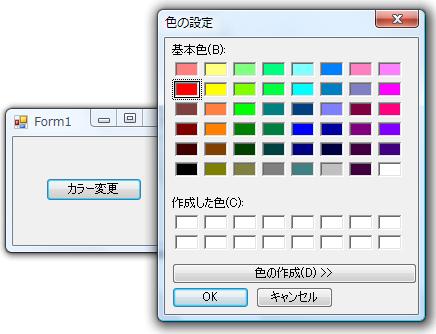
すると、選択した色がボタン背景色として反映。
テキストも反転カラーで表示。