C#を使って、SSHによるコマンド実行と、SCPによるファイルアップロード、ダウンロードを行うサンプルプログラム。
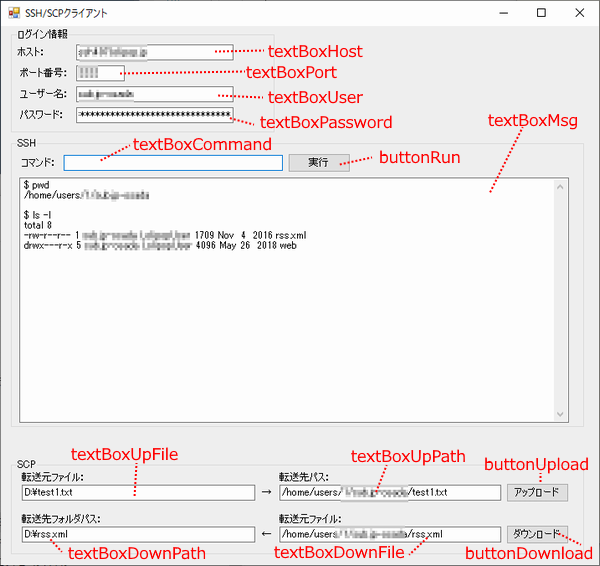
SSHの「コマンド」欄に、接続先サーバのコマンドを入力し「実行」ボタンを押すと、ログイン情報をもとにSSH接続してリモート先コマンドを実行します。
実行結果は、その下のテキスト欄(TextBoxMsg)に表示されます。
同じく、SCPも転送元ファイル(自分のWindowsPC上のファイルをフルパス指定)と、転送先パス(リモートホスト上のパス)を入力した上で「アップロード」ボタンを押すと、ログイン情報をもとにファイルをアップします。
ダウンロードもその逆で同じです。
今回は疎通確認しやすいように画面付きだけど、自動化とかする際はコマンド化して作った方が使えそう。
ソースコード
using System;
using System.Collections.Generic;
using System.ComponentModel;
using System.Data;
using System.Drawing;
using System.Linq;
using System.Text;
using System.Windows.Forms;
using Renci.SshNet;     // ソリューションエクスプローラ>参照>NuGetパッケージの管理>「SSH.NET」を追加

namespace sshClient
{
    public partial class Form1 : Form
    {
        public Form1()
        {
            InitializeComponent();
        }

        private void Form1_Load(object sender, EventArgs e)
        {
            textBoxHost.Text = "";
            textBoxPort.Text = "22";
            textBoxUser.Text = "";
            textBoxPassword.Text = "";
        }

        // SSHコマンド実行
        private void buttonRun_Click(object sender, EventArgs e)
        {
            buttonRun.Enabled = false;
            try
            {
                // コネクション情報
                ConnectionInfo info = new ConnectionInfo(
                    textBoxHost.Text,
                    Convert.ToInt32(textBoxPort.Text),
                    textBoxUser.Text,
                    new AuthenticationMethod[] {
                        new PasswordAuthenticationMethod(textBoxUser.Text, textBoxPassword.Text)
                    }
                );

                // SSHクライアントオブジェクトを生成し接続
                SshClient ssh = new SshClient(info);
                ssh.Connect();
                if (!ssh.IsConnected)
                {
                    txtMsg("SSH接続に失敗しました");
                    return;
                }

                // SSHコマンド実行
                var commandString = textBoxCommand.Text;
                SshCommand cmd = ssh.CreateCommand(commandString);
                txtMsg("$ " + commandString);
                cmd.Execute();

                var stdOut = cmd.Result;
                var stdErr = cmd.Error;

                if (stdOut != string.Empty)
                {
                    // コマンド実行結果を表示
                    txtMsg(stdOut);
                }

                if (cmd.ExitStatus != 0 && stdErr != string.Empty)
                {
                    // エラー出力を表示
                    txtMsg(stdErr);
                }

                // 接続終了
                ssh.Disconnect();
            }
            catch (Exception ex)
            {
                MessageBox.Show(ex.ToString());
            }
            textBoxCommand.Text = "";
            buttonRun.Enabled = true;
        }

        private void textBoxCommand_KeyUp(object sender, KeyEventArgs e)
        {
            if (e.KeyCode == Keys.Enter)
            {
                buttonRun_Click(null, null);
            }
        }

        private void txtMsg(string msg)
        {
            textBoxMsg.Text += msg.Replace("\n","\r\n") + "\r\n";
            textBoxMsg.SelectionStart = textBoxMsg.Text.Length;
            textBoxMsg.ScrollToCaret();
        }

        // SCPアップロード
        private void buttonUpload_Click(object sender, EventArgs e)
        {
            buttonUpload.Enabled = false;
            try {
                using (var client = new ScpClient(textBoxHost.Text, Convert.ToInt32(textBoxPort.Text), textBoxUser.Text, textBoxPassword.Text))
                {
                    client.RemotePathTransformation = RemotePathTransformation.ShellQuote;
                    client.Connect();

                    System.IO.FileInfo fi = new System.IO.FileInfo(textBoxUpFile.Text);
                    client.Upload(fi, textBoxUpPath.Text);
                }
            }
            catch (Exception ex)
            {
                MessageBox.Show(ex.ToString());
            }
            buttonUpload.Enabled = true;
        }

        // SCPダウンロード
        private void buttonDownload_Click(object sender, EventArgs e)
        {
            buttonDownload.Enabled = false;
            try
            {
                using (var client = new ScpClient(textBoxHost.Text, Convert.ToInt32(textBoxPort.Text), textBoxUser.Text, textBoxPassword.Text))
                {
                    client.RemotePathTransformation = RemotePathTransformation.ShellQuote;
                    client.Connect();

                    System.IO.FileInfo fi = new System.IO.FileInfo(textBoxDownPath.Text);
                    client.Download(textBoxDownFile.Text, fi);
                }
            }
            catch (Exception ex)
            {
                MessageBox.Show(ex.ToString());
            }
            buttonDownload.Enabled = true;
        }
    }
}
<追記>
・ソースコード9行目の補足
Renci.SshNetを利用するのでビルドエラーにならないよう、以下を行います。
①ソリューションエクスプローラでプロジェクト配下の「参照」を右クリック
②「NuGetパッケージの管理」を選択
③「NuGetパッケージの管理」画面の「参照」タブを開く
④「SSH.NET」を検索してインストール
・実行時エラー
例外処理などは割愛しています。
エラーになった場合、デバッグしながらエラー詳細を調査する必要があります。
作成時の誤入力も考えられるため、Visual Studio 2022で作成したサンプルプロジェクト(ソース一式)を載せておきます。
⇒サンプルプロジェクト

上記と同じように作成しましたが、SCP使用時にエラーが出てしまいます。考えられる原因は何でしょうか?
当方で動作確認済みのサンプルを上記に載せました。
こちらでも試してみてください。
それでも接続できない場合は、恐らく接続情報誤り等も考えられると思います。
Renci.SshNetを利用しているので、詳細なエラー情報を得られない可能性もありますが、エラー発生時、デバッグして詳細を調べる必要があります。
有益な情報ありがとうございます。
接続はできているようなのですが、ローカルフォルダへのアクセスが拒否されてしまいます。
何か現認は考えられるでしょうか?
アクセス拒否の原因は分かりませんが、可能性の1つとしてウィルス対策ソフト等が
ブロックしている可能性などが考えられると思います。
また、Windowsのバージョンなどにもよりけりだと思いますが、exeファイルからは
アクセスできないフォルダ(例えば、C:\Program Files配下)があるかも知れません。
別フォルダで試してみてください。
後はデバッグで詳細を調査したり、ファイル書き込み部分に絞り込んだショート
プログラムを作成することによって原因を特定できるかも知れません。